
Resize Coursera Mini Video Player with Ease
Overview
The software enables users to resize the Coursera mini video player directly within the browser, enhancing the viewing experience during online learning. Designed specifically for learners navigating Coursera courses, it addresses the limitation of the default fixed-size mini player that appears when scrolling through course pages. This tool allows for greater customization and visual comfort, particularly on larger screens or when users prefer a more immersive playback experience. It is ideal for students, educators, and professionals who frequently engage with Coursera’s course content and seek a more flexible interface.
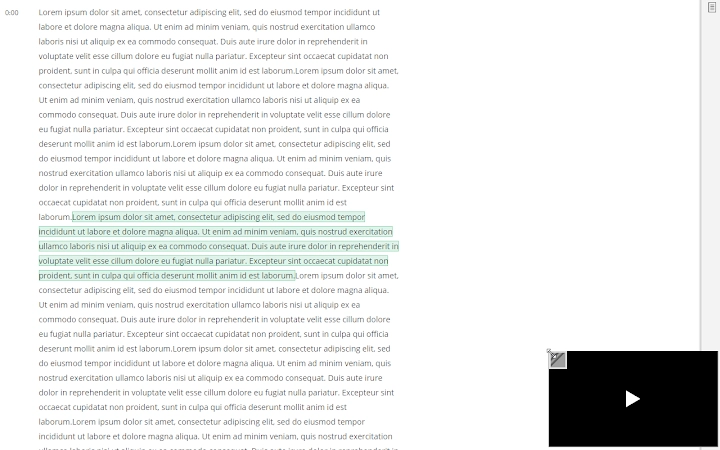
By simply hovering over the mini player, users gain access to resize handles, enabling them to adjust the player size dynamically through drag-and-drop interaction. This functionality supports a seamless workflow without requiring changes to browser settings or external tools. The software operates entirely within the browser environment, making it accessible and non-intrusive. Its lightweight design ensures minimal impact on system resources, aligning with modern expectations for efficient web-based utilities.
The developer did not provide additional details about their background or development history. Platform compatibility information is limited to Windows and Mac, suggesting broad accessibility across major desktop operating systems. Real-world usage scenarios include watching course videos while taking notes, comparing content side-by-side, or adapting the player to different screen resolutions. The tool is particularly useful in multitasking environments where visual clarity and space optimization are essential.
Key Features & Capabilities
- Dynamic Mini Player Resizing – Users can resize the Coursera mini video player to any dimension by dragging the resize handles that appear on hover, allowing for personalized viewing preferences.
- Browser-Based Operation – The tool functions entirely within the browser, requiring no installation beyond standard extension setup, ensuring compatibility with most modern web environments.
- Intuitive Hover Activation – Resize controls are activated only when the user hovers over the mini player, reducing interface clutter and maintaining a clean user experience.
- Seamless Workflow Integration – Designed to work without disrupting the existing course navigation, enabling users to resize the player mid-session without reloading pages.
- Lightweight and Efficient – With a file size of 1.2 MB, the tool is optimized for fast loading and minimal resource consumption during operation.
For example, a student reviewing a programming course can expand the mini player to view code snippets more clearly while keeping the course content visible. Similarly, an educator preparing a lecture may use the tool to demonstrate video content at a larger scale during screen-sharing sessions. The resize functionality also supports users with visual impairments who require larger playback windows for better visibility. These capabilities enhance usability and adaptability across diverse learning environments.
User Interface, Workflow & Performance
The user interface is minimal and context-aware, relying on the browser’s native rendering to display the Coursera mini player. The tool introduces no additional windows, menus, or settings panels, maintaining a clean and distraction-free experience. Interaction occurs exclusively through hover-based activation of resize handles, which appear at the corners and edges of the player. This design prioritizes simplicity and reduces cognitive load, making it accessible even to users with limited technical experience.
Navigation is intuitive: users simply open a Coursera course, play a video, and hover over the mini player to access resizing controls. The drag-and-drop mechanism allows for real-time adjustments, with the player size updating immediately as the user moves the cursor. Workflow efficiency is high, as no additional steps—such as opening a settings menu or switching applications—are required. The tool integrates smoothly into the existing course interface, preserving the original layout and functionality.
Performance observations are based on general software behavior patterns. The developer did not specify resource usage details. However, the tool’s lightweight nature and browser-based execution suggest low CPU and RAM consumption during active use. Stability is expected to be consistent with standard browser extension behavior, though exact behavior may vary depending on the user’s browser and system configuration. No reports of crashes or conflicts were included in the provided data.
Compatibility & System Requirements
The software is compatible with Windows and Mac operating systems, supporting a broad range of desktop environments. It is designed to function within modern web browsers used for accessing Coursera’s platform, though specific browser versions were not listed. The installation size is 1.2 MB, indicating a compact footprint that requires minimal disk space.
Exact system requirements were not listed. The developer did not provide information on minimum CPU, RAM, or graphics specifications. Compatibility with older operating system versions is unclear. Platform compatibility information is limited to the two major desktop platforms, suggesting it may not be available for Linux or other systems. Users are advised to ensure their browser is up to date to avoid potential rendering or functionality issues.
Pros and Cons
Pros
- Simple, intuitive resizing functionality with hover-based activation
- Lightweight design (1.2 MB) with minimal system impact
- Browser-based tool requiring no complex setup
- Enhances usability for online learning on large or high-resolution screens
- Free to use with no hidden costs or subscriptions
Cons
- Limited to Coursera’s mini player; not applicable to other platforms
- No visible settings or customization options beyond resizing
- Compatibility with specific browsers not specified
- Requires user to widen browser window to trigger mini player visibility
- Developer background and support channels not disclosed
FAQ Section
Is this tool compatible with all web browsers?
The software is designed for use with modern browsers on Windows and Mac, but specific browser compatibility was not provided by the developer.
Is the software safe to use?
As a browser extension that operates within the user’s environment, the tool does not collect personal data. However, users should only install extensions from trusted sources to ensure security.
Can I use this tool offline?
The tool requires an active internet connection and access to Coursera’s website to function, as it operates within the browser during course playback.
Does the software require a license?
No, the software is free and does not require a license key or activation process.
How do I update the software?
Updates are typically managed automatically by the browser’s extension store. Users should ensure their browser is updated to receive the latest version.
Final Thoughts + CTA
This lightweight utility offers a focused, effective solution for users seeking greater control over the Coursera mini video player. While its functionality is limited to a single platform and use case, it delivers a significant improvement in usability for online learners who value customization and visual clarity. The absence of complex settings or resource demands makes it ideal for users who want a no-frills enhancement to their learning experience.
It is particularly beneficial for students, educators, and professionals who frequently access Coursera courses and desire a more flexible playback interface. Despite the lack of developer transparency and detailed compatibility information, the tool’s simplicity and free availability make it a compelling choice for targeted use.
Download Resize Coursera Mini Video Player with Ease now and take full control of your online learning experience.







